Introduction to Operating System
An Operating System (OS) acts as an intermediary between the computer hardware and the user. It prevents users from directly accessing the hardware and manages all system resources.
It provides an environment in which users can execute programs conveniently and efficiently. An operating system is a program that runs continuously while the computer is on. It allocates resources such as memory, the CPU, and input/output (I/O) devices to the processes that require them.
Examples of Operating Systems:
- Windows – Developed by Microsoft; widely used for personal and business computers.
- macOS – Apple's operating system for Mac computers.
- Linux – An open-source operating system available in many distributions (e.g., Ubuntu, Fedora).
- ChromeOS – Google's lightweight operating system designed for Chromebooks.
- Android – Google's operating system for smartphones, tablets, and other smart devices.
- iOS – Apple's operating system for iPhones.
- UNIX – A powerful, multiuser operating system commonly used in servers and workstations.
- BSD – A family of UNIX-like operating systems known for stability, performance, and security.
Operating System and User Interaction
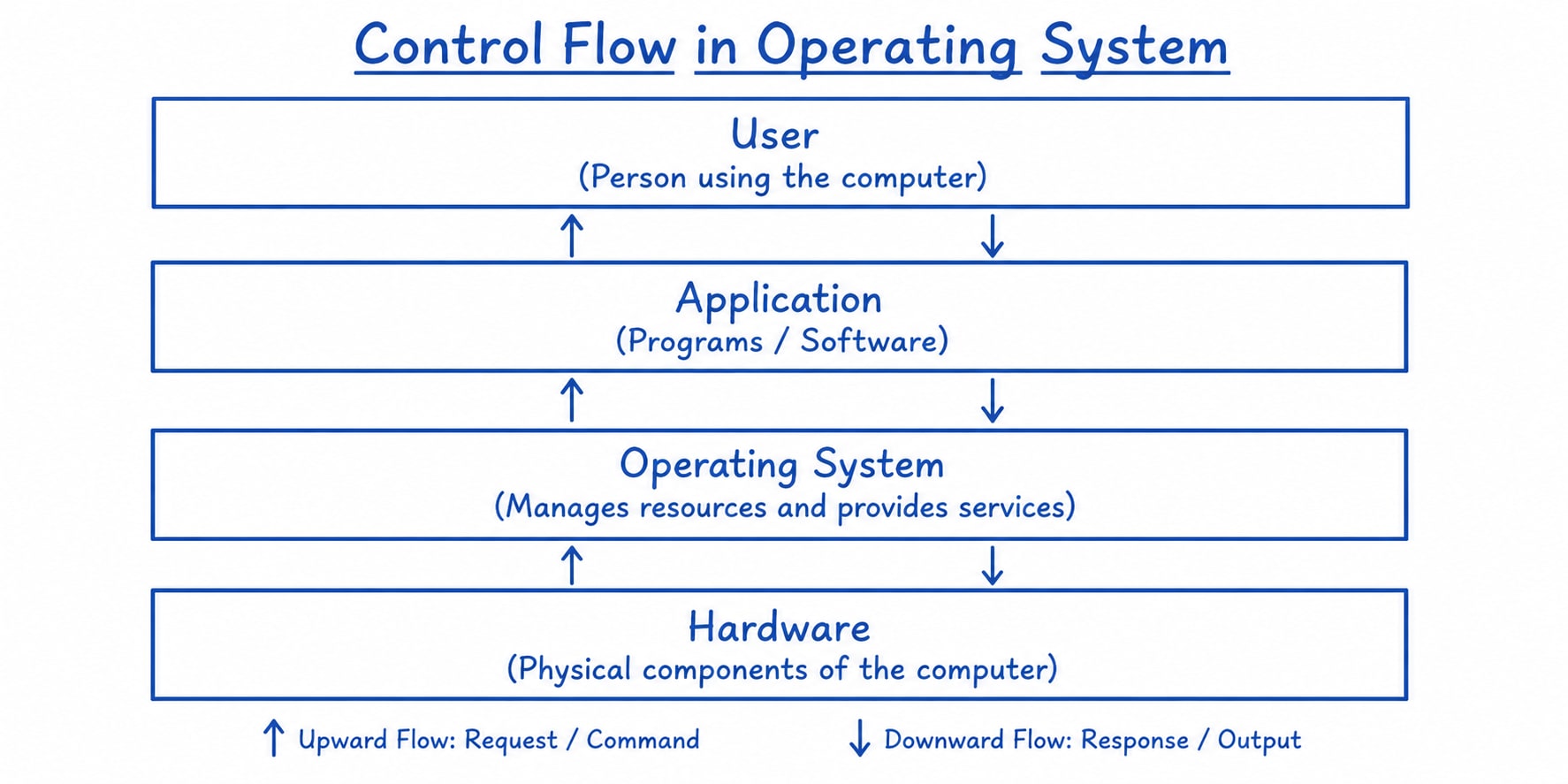
Every general-purpose computer consists of four main components:
- Hardware - The hardware includes the CPU, ALU, memory, I/O devices, peripheral devices, and storage devices.
- Operating System - An operating system always runs in the background to manage and coordinate the use of hardware resources among system and application programs for one or more users.
- System Programs - The system programs include compilers, loaders, editors, and the operating system itself.
- Application Programs - The application programs are user-level software designed to perform specific tasks.
The operating system is not just a user interface. Instead, it provides interfaces through which users can interact with the computer, including:
- Command-Line Interface (CLI)(e.g., Bash, PowerShell)
- Graphical User Interface (GUI)(e.g., Windows Desktop, macOS Finder)
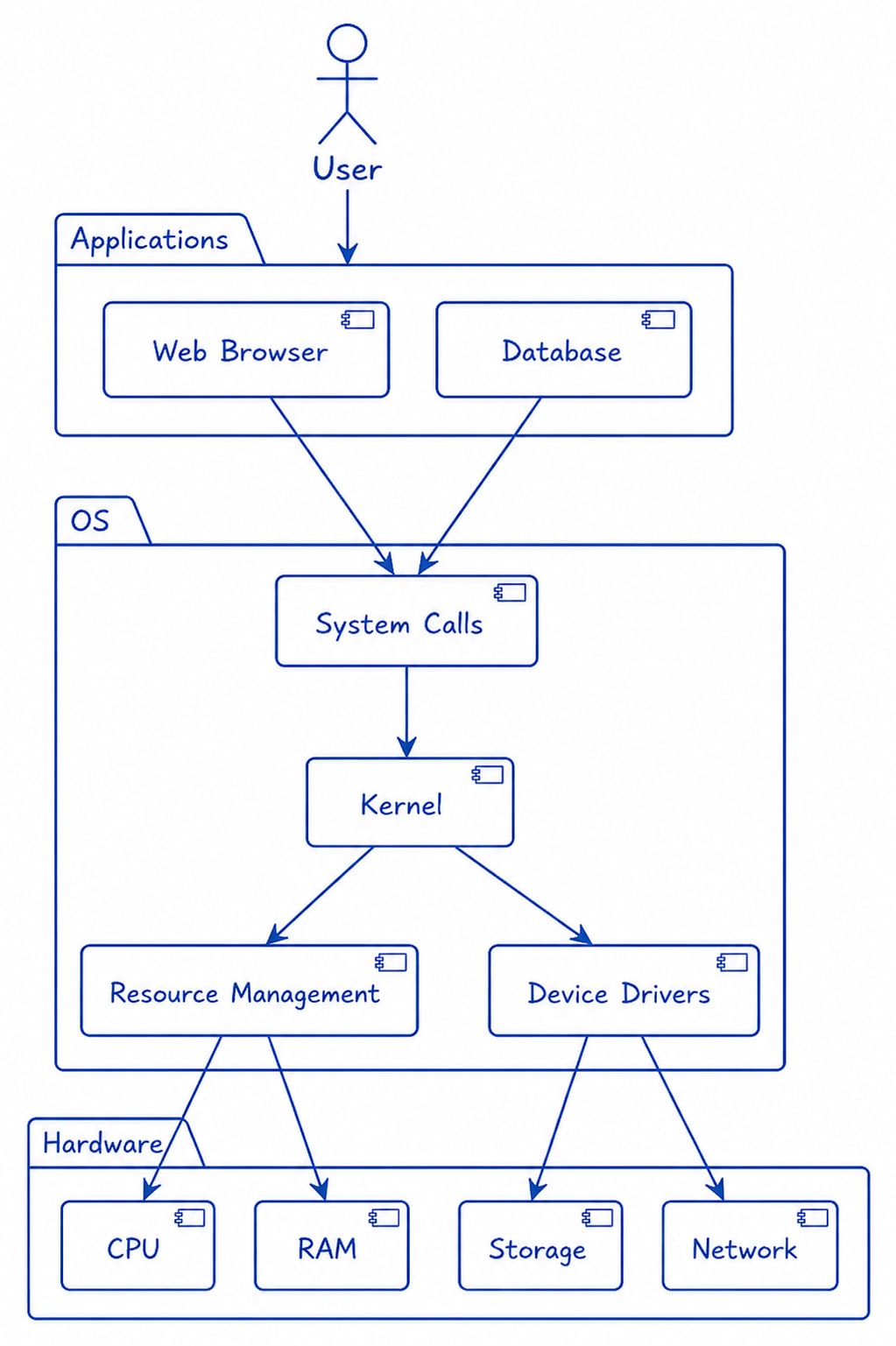
At the core of every operating system is the Kernel, which acts as the bridge between hardware and software. It performs low-level tasks such as process management, memory management, file system management, and device management.
Goals of an Operating System
An operating system is system software that acts as an interface between the user and computer hardware. It manages system resources and provides a platform for executing programs efficiently.
Primary Goals
The primary goals of an operating system are to provide a convenient environment for executing user programs and to manage system resources efficiently.
-
User Convenience - The operating system should provide a user-friendly interface that makes it easy for users to interact with the computer.
-
Program Execution - It provides the necessary environment and services required to execute user programs efficiently.
-
Resource Management - The OS manages and allocates computer resources such as the CPU, memory, disk storage, and I/O devices to ensure efficient and fair utilization.
-
Security - The operating system protects the system and user data from unauthorized access, ensuring the confidentiality, integrity, and availability (CIA) of information.
Secondary Goals
The secondary goals of an operating system focus on improving overall system performance, stability, and reliability.
-
Efficient Resource Utilization - The OS aims to maximize the utilization of system resources such as the CPU, memory, and I/O devices to improve overall performance.
-
Reliability - The operating system should be robust and reliable. It should handle errors gracefully, continue operating smoothly, and be modular so that it is easier to maintain and debug.
Components of an Operating System
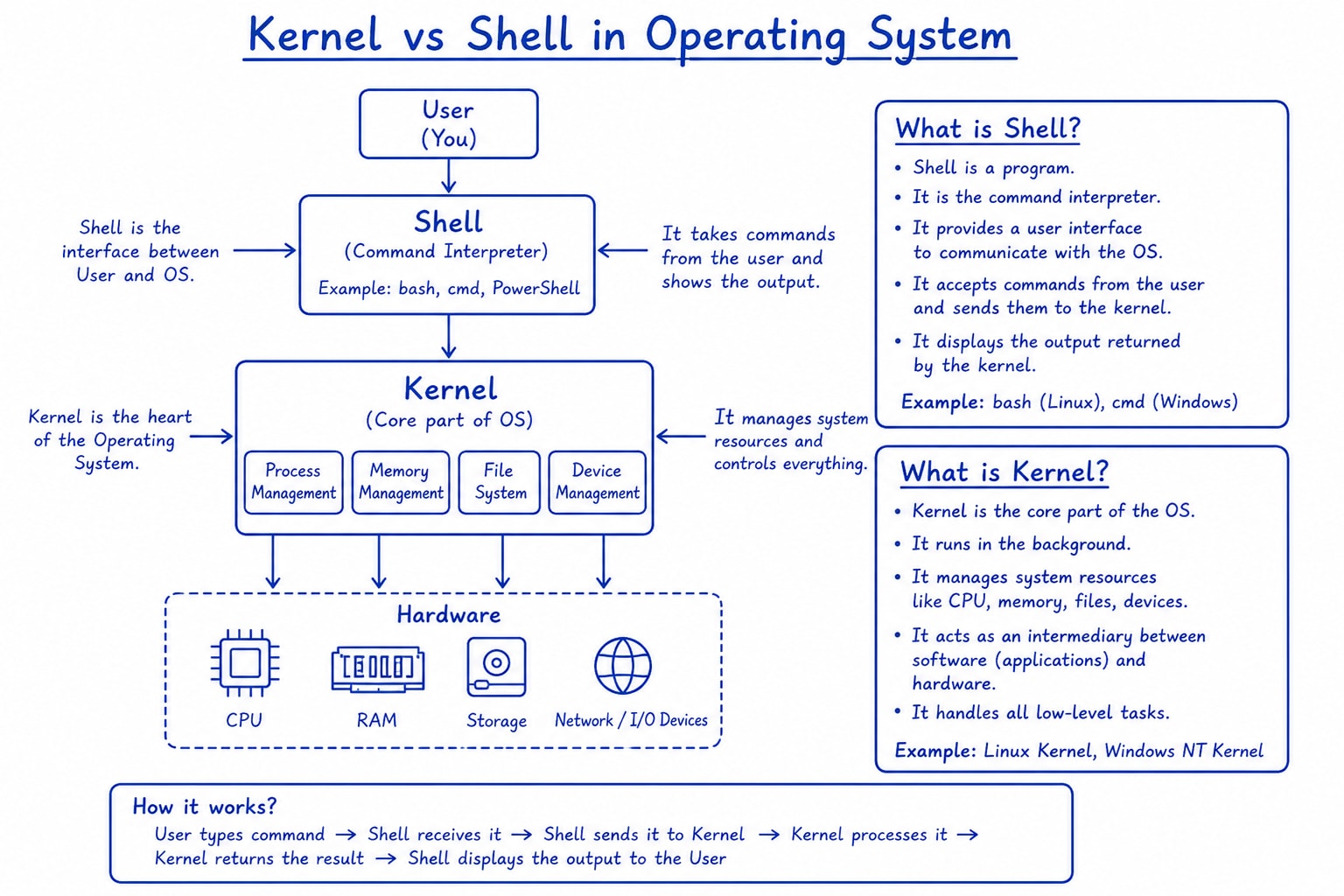
An operating system has two main components:
-
Shell - The Shell is the user interface that interacts with the kernel, which in turn, interacts with the underlying hardware. It is a command line interface (CLI) or a graphical user interface (GUI) through which users can communicate with the computer and execute various commands and programs. If you’ve ever seen a TV show or movie with a hacker sat at a black terminal screen with green text, this is the classic shell CLI. The Shell interprets commands entered by the user and sends instructions to the OS to perform tasks. It provides features like scripting, exploring and writing to a file system, automation and process management. Examples of popular shells include Bash (Bourne Again SHell), PowerShell, Fish and Zsh.
-
Kernel - The Kernel is the core component of an OS. It makes a bridge between the applications and the computer hardware. The kernel manages resources of the computer, such as memory, processors, and file systems. It provides an abstraction layer that shields apps from the complexities of the underlying hardware, which allows software to run efficiently. The kernel is responsible for tasks like scheduling processes, managing memory, and enforcing security policies. It is the first program that runs when a computer starts up and remains in memory throughout the system’s operations. Different operating systems have different kernel designs, such as the Linux kernel, Windows kernel and macOS kernel. The kernel plays a crucial role in maintaining stability, security, and overall functionality of the operating system.
Applications of an Operating System
-
Platform for Application Programs - The operating system provides a platform on which application programs can run.
-
Managing Input and Output Devices - It manages hardware resources such as memory, monitors, keyboards, printers, and other I/O devices to ensure efficient and fair resource utilization.
-
Multitasking - The operating system allows multiple programs to run simultaneously by managing memory efficiently. It also enables communication between processes when required.
-
Memory and File Management - The OS manages both primary memory (RAM) and secondary storage. It allocates and deallocates memory to processes and organizes files efficiently.
-
Security - The operating system protects the system through authentication, authorization, and access control mechanisms, helping keep both the system and user data secure.
Factors to Consider When Choosing an Operating System
Several factors should be considered when selecting an operating system.
-
Price - Some operating systems, such as Linux, are free and open source, whereas others, such as Windows and macOS, require a paid license or are bundled with hardware.
-
Ease of Use - Some operating systems, such as Windows and macOS, are easier for beginners to use, whereas Linux generally has a steeper learning curve.
-
Compatibility - Different operating systems support different software and hardware. Choose an operating system that is compatible with the applications and devices you need.
-
Security - Security is an important factor when choosing an operating system. Windows, macOS, and Linux all provide strong security features. However, overall security depends on proper system configuration, regular updates, and safe user practices.
Types of Operating Systems
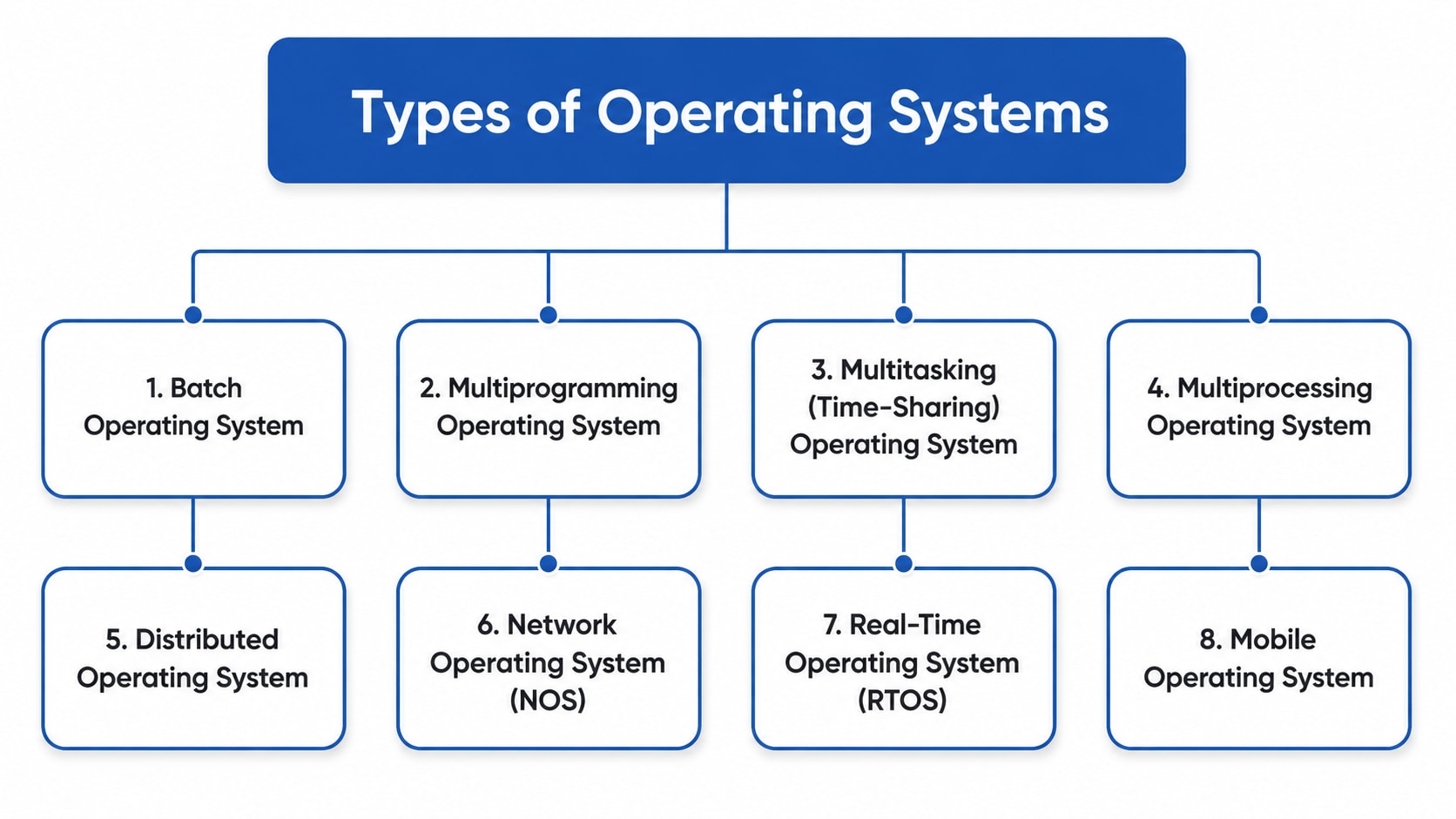
An Operating System (OS) is system software that manages computer hardware and software resources. It acts as a bridge between the user and the computer, ensuring smooth and efficient operation.
Different types of operating systems are designed for different purposes. Some handle one task at a time, while others support multiple users, multiple programs, or real-time processing.
1. Batch Operating System
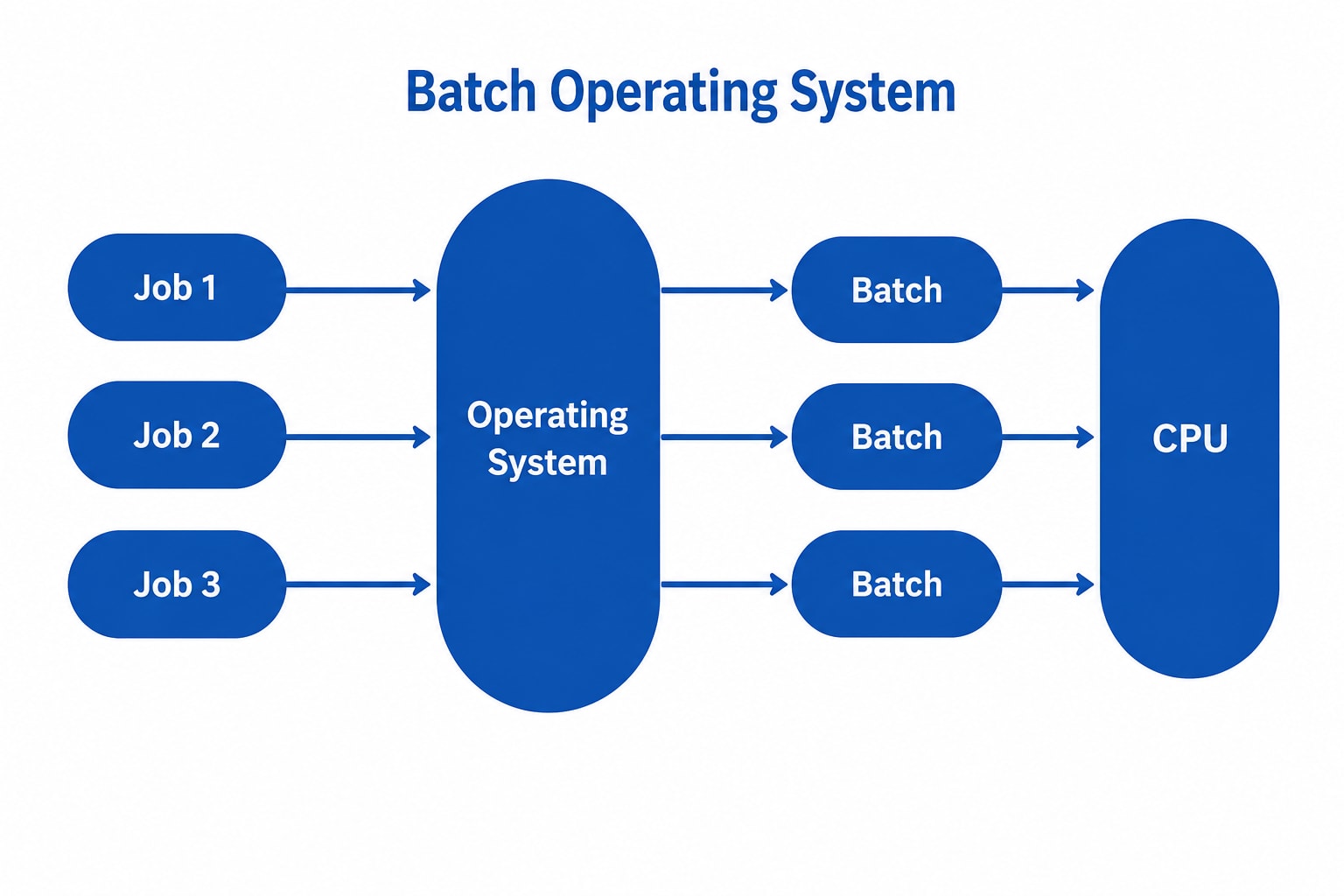
A Batch Operating System is designed to process a large number of similar jobs efficiently. Users do not interact directly with the computer while the jobs are running. Instead, jobs are grouped into batches by an operator and executed one after another automatically.
Features
- Processes similar jobs in batches.
- No user interaction during execution.
- Jobs are executed sequentially.
Advantages
- Minimal Idle Time: Processes jobs continuously with little human intervention.
- Handles Repetitive Tasks: Suitable for tasks such as payroll processing and billing.
- High Throughput: Can process a large number of jobs efficiently.
Disadvantages
- Poor CPU Utilization: The CPU may remain idle during I/O operations.
- High Response Time: Users must wait until all previous jobs finish.
- No Real-Time Interaction: Users cannot communicate with the system while jobs are executing.
Examples
- Payroll Processing
- Insurance Claim Processing
- Library Record Management
- Stock Market Report Generation
2. Multiprogramming Operating System
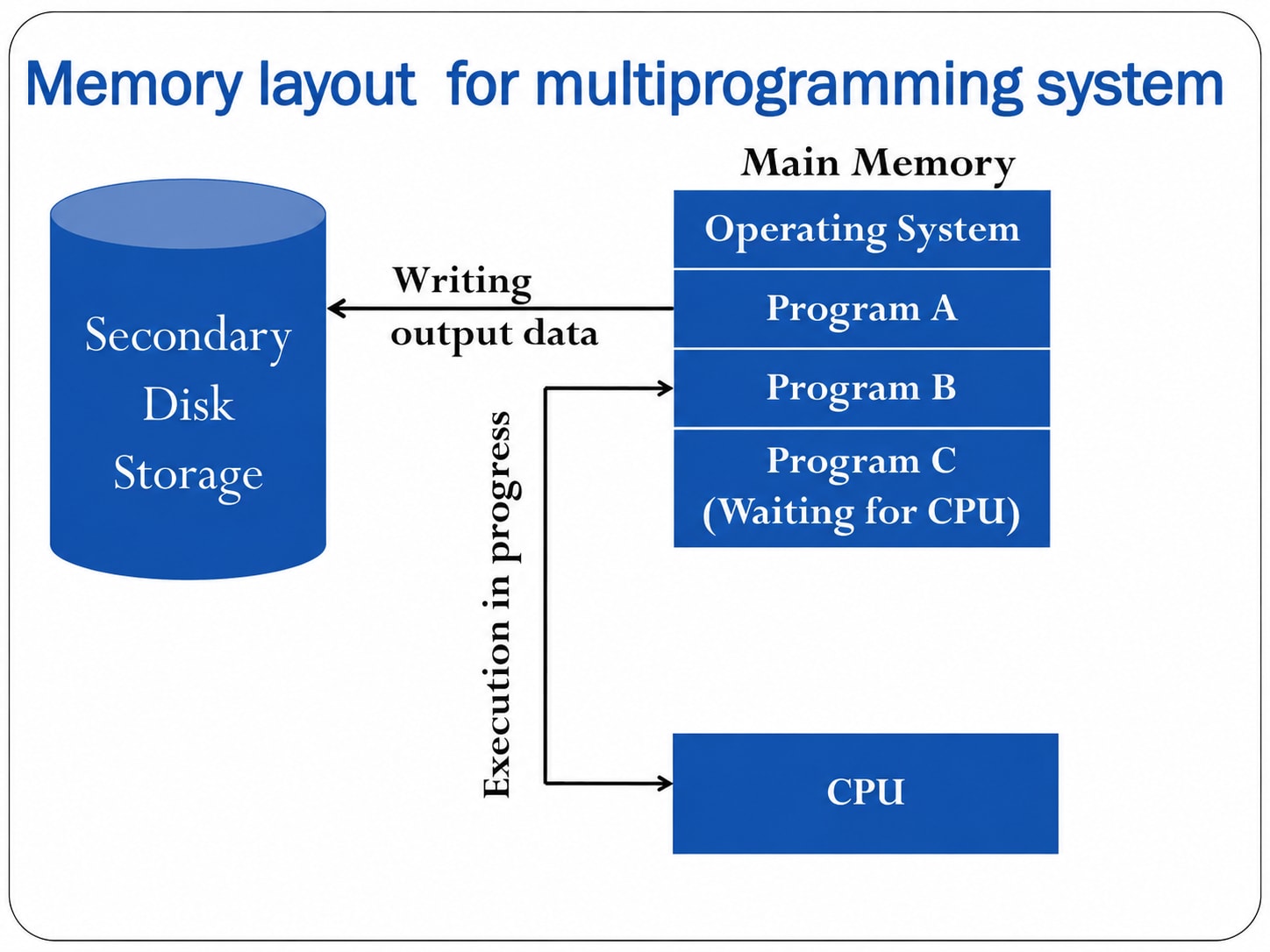
A Multiprogramming Operating System keeps multiple programs in the main memory at the same time. When one program waits for an I/O operation, the CPU switches to another program, improving CPU utilization.
Features
- Multiple programs remain in memory simultaneously.
- CPU switches between programs during I/O waits.
- Improves CPU efficiency.
Advantages
- Better CPU utilization.
- Higher system throughput.
- Efficient use of CPU, memory, and I/O devices.
Disadvantages
- Complex memory management.
- Higher memory requirements.
- Increased security concerns.
Examples
- Banking Systems
- Railway Reservation Systems
- Billing Systems
3. Multitasking (Time-Sharing) Operating System
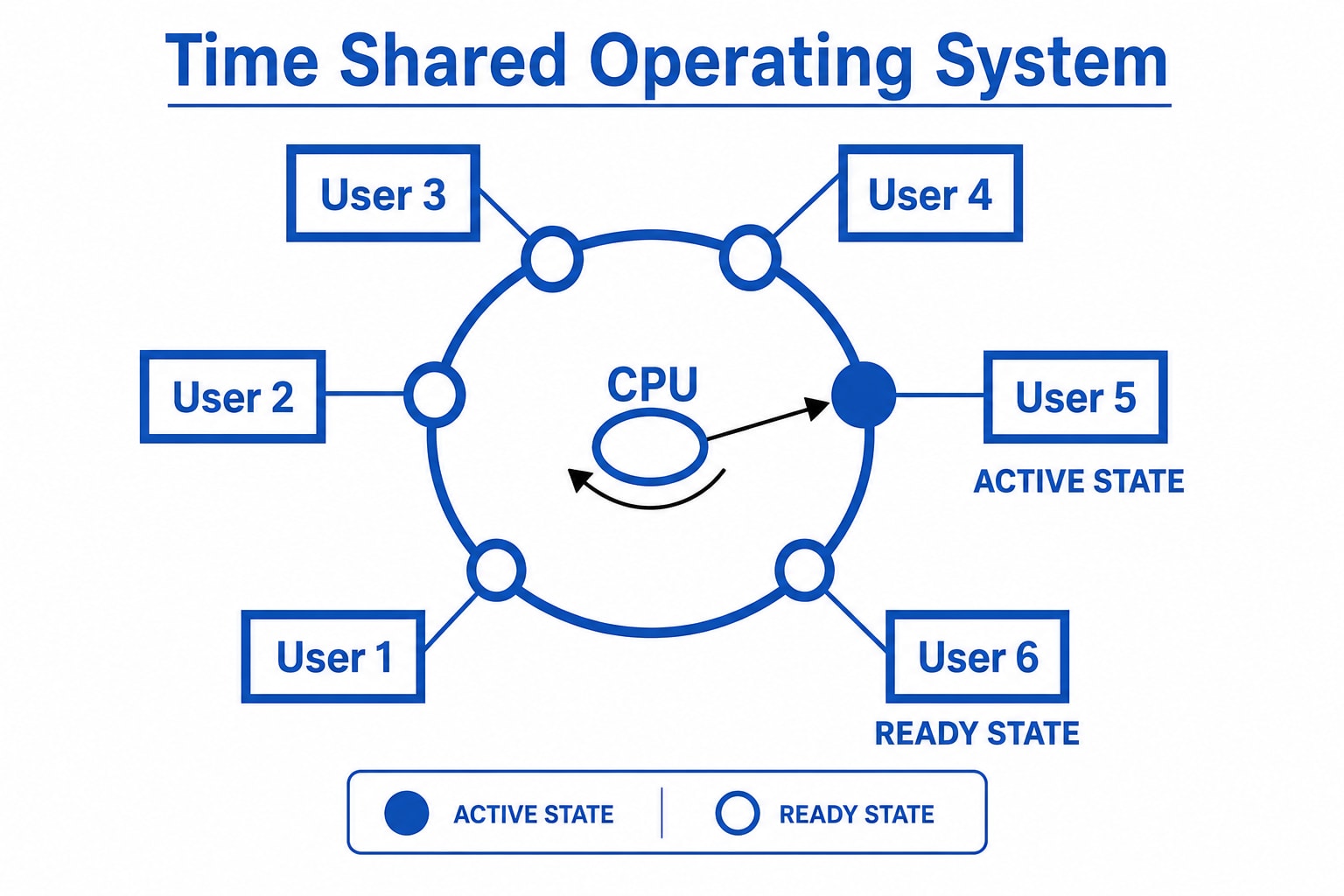
A Multitasking (Time-Sharing) Operating System allows multiple tasks or users to share the CPU. Each task is assigned a small amount of CPU time called a time slice (quantum). After the time slice expires, the CPU switches to the next task.
Features
- Supports multiple users and tasks.
- Uses Round Robin scheduling.
- Provides fast user interaction.
Advantages
- Fair CPU allocation.
- Low CPU idle time.
- Multiple users can share the same system.
Disadvantages
- Lower reliability if the system fails.
- Security and privacy concerns.
- Data-sharing conflicts may occur.
Examples
- IBM VM/CMS
- TSO (Time Sharing Option)
- Windows Terminal Services
4. Multiprocessing Operating System
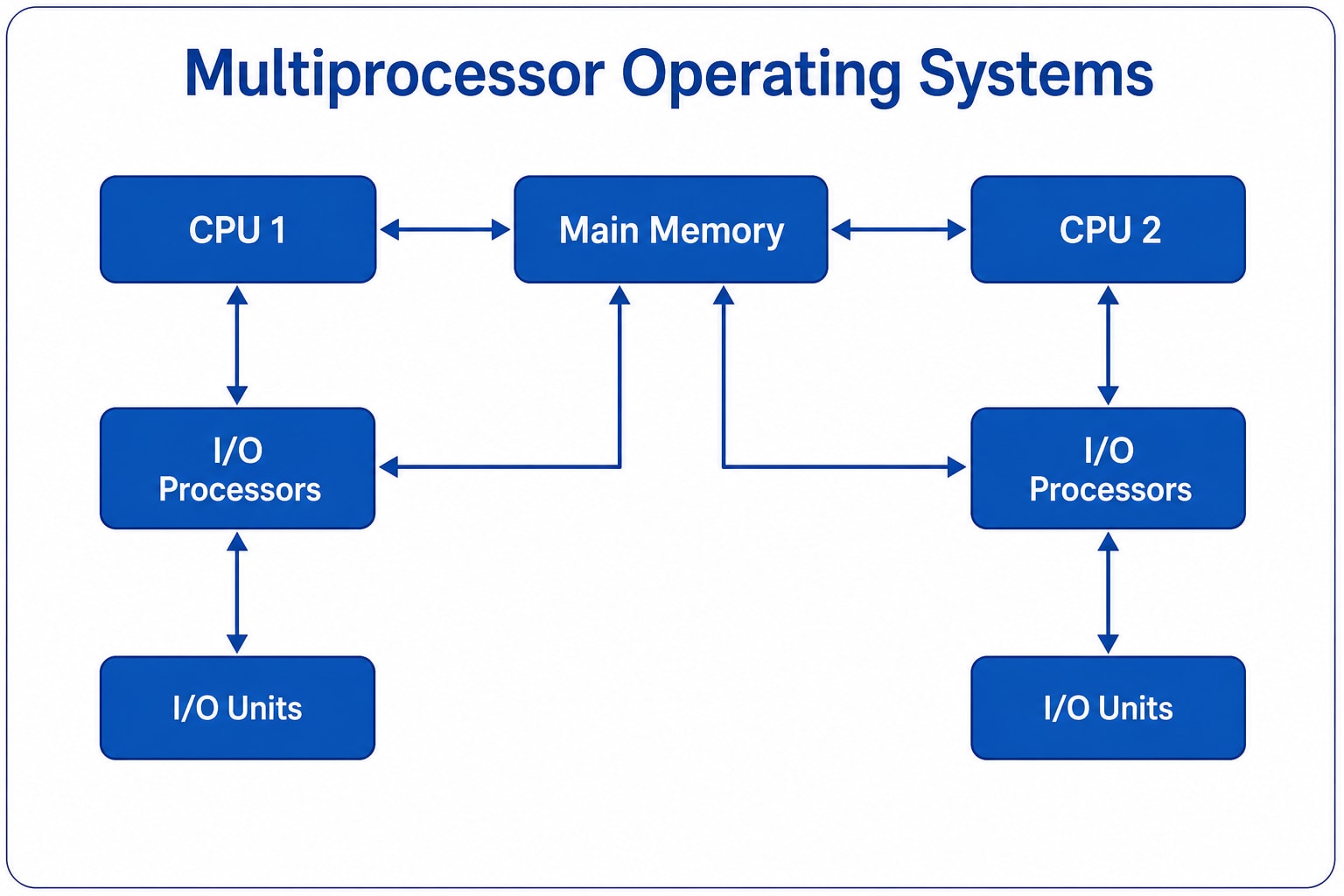
A Multiprocessing Operating System uses two or more CPUs (or processor cores) to execute processes simultaneously, increasing performance and reliability.
Features
- Uses multiple processors.
- Executes multiple processes simultaneously.
- Improves system performance.
Advantages
- Faster processing.
- Higher reliability.
- Suitable for computationally intensive applications.
Disadvantages
- Expensive hardware.
- Complex operating system design.
- Uneven task distribution may reduce efficiency.
Examples
- Linux
- UNIX
- macOS
5. Distributed Operating System
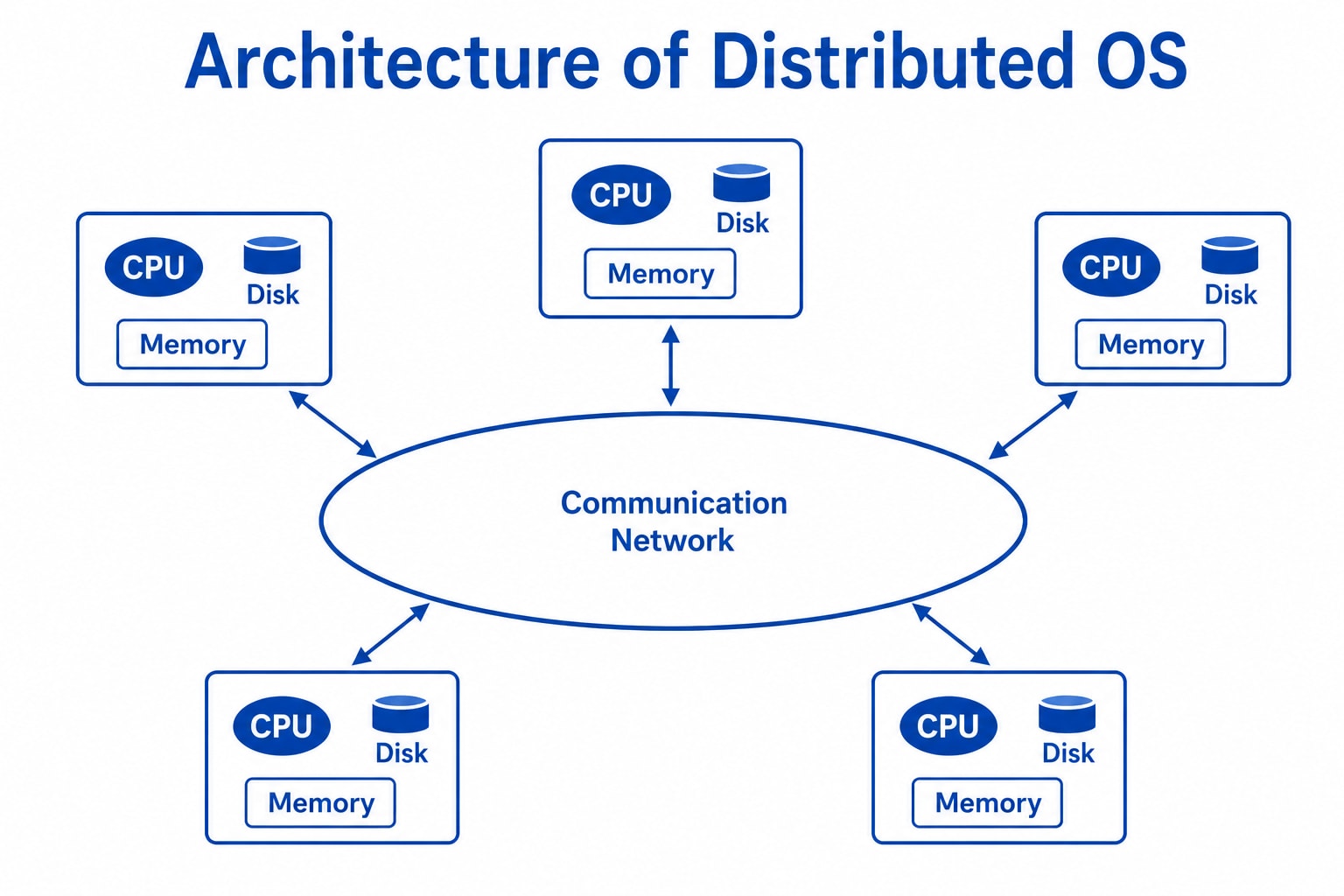
A Distributed Operating System connects multiple independent computers through a network. Each computer has its own CPU and memory but works together as a single system.
Features
- Multiple computers work together.
- Resources are shared across the network.
- Supports remote access.
Advantages
- Failure of one computer usually does not stop the entire system.
- Easy to expand by adding more computers.
- Faster execution through distributed processing.
Disadvantages
- Depends heavily on the network.
- Complex design and maintenance.
- Higher implementation cost.
Issues in Distributed Operating Systems
- Network delays can cause inconsistent data.
- Resource allocation and scheduling are more difficult.
- Messages sent over public networks may be intercepted or modified if proper security is not implemented.
Examples
- LOCUS
- Amoeba
- MICROS
6. Network Operating System (NOS)
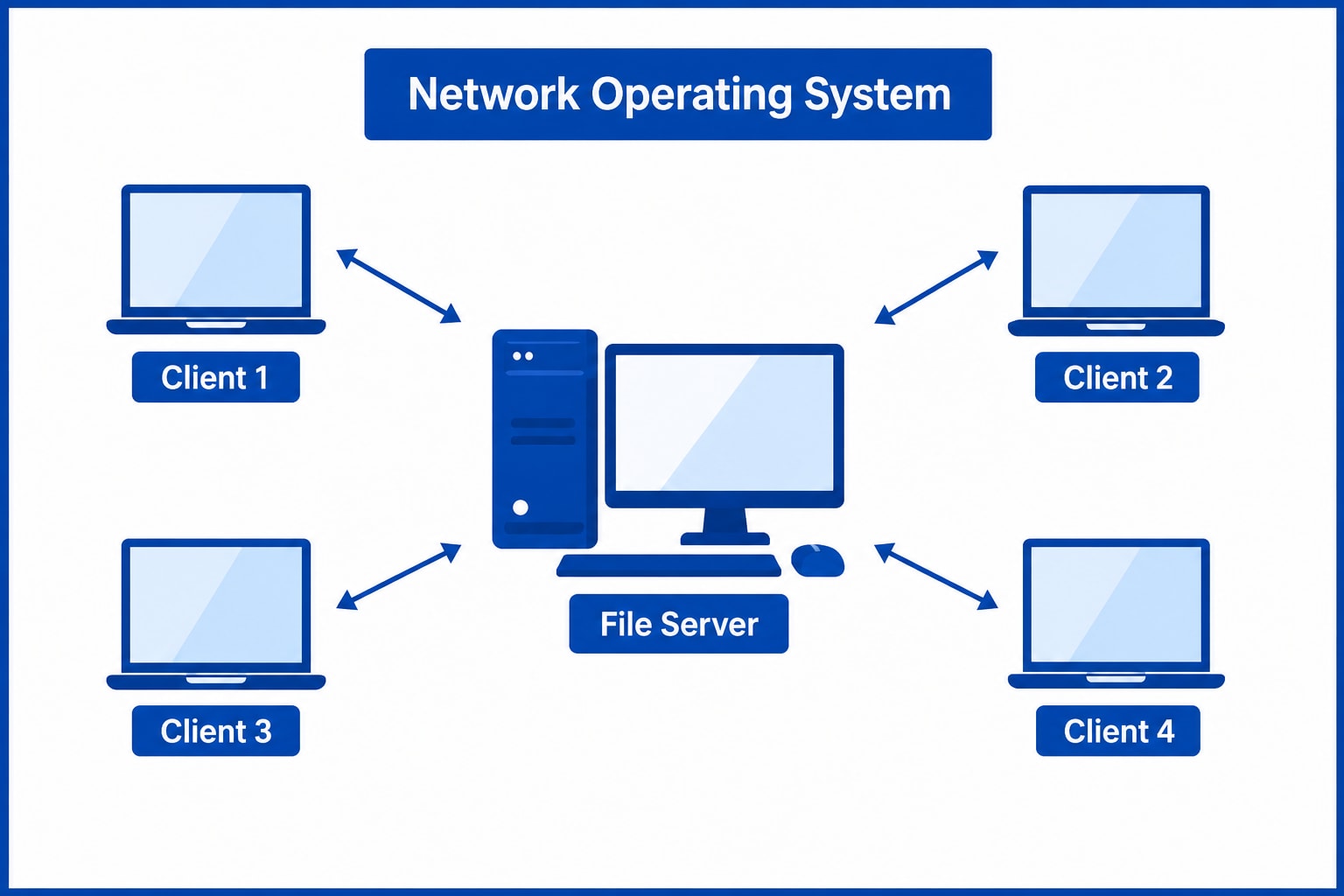
A Network Operating System (NOS) runs on a server and manages users, files, printers, security, and network resources. It enables multiple computers to share resources over a network.
Features
- Centralized management.
- Shared files and printers.
- User authentication and security.
Advantages
- Centralized administration.
- Easy hardware and software upgrades.
- Supports remote access.
Disadvantages
- Expensive server setup.
- Dependence on the central server.
- Requires regular maintenance.
Examples
- Windows Server
- Linux Server
- UNIX Server
7. Real-Time Operating System (RTOS)
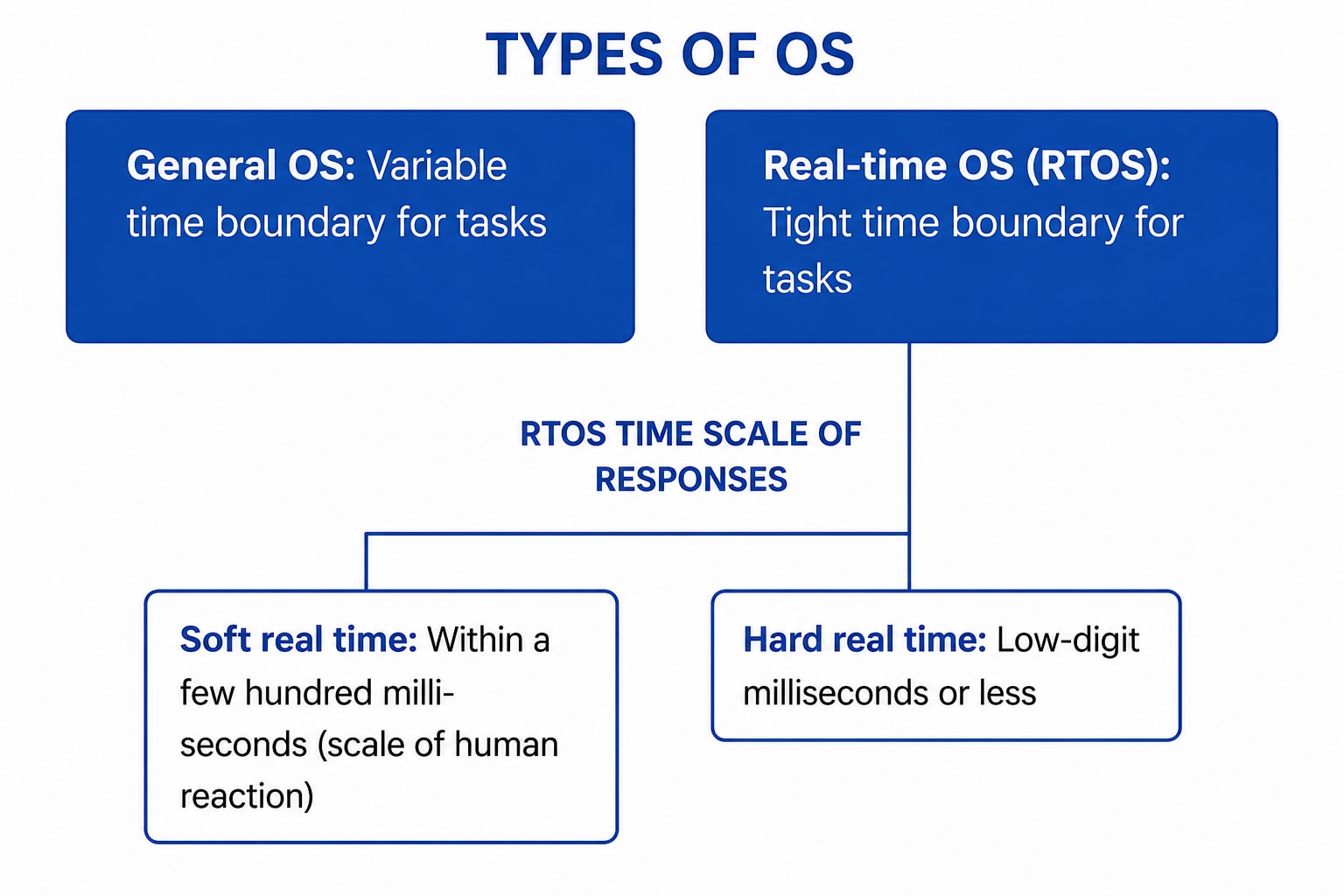
A Real-Time Operating System (RTOS) processes data and responds within a fixed time limit called the response time. It is used in systems where timing is critical.
Types of RTOS
-
Hard Real-Time Operating System
A Hard RTOS guarantees that all tasks are completed within strict deadlines. Even a small delay is unacceptable.
Examples
- Airbag Systems
- Missile Guidance Systems
- Automatic Parachute Systems
-
Soft Real-Time Operating System
A Soft RTOS aims to meet deadlines, but occasional delays are acceptable.
Examples
- Video Streaming
- Multimedia Applications
- Online Gaming
Advantages
- Efficient resource utilization.
- Fast and predictable response.
- Reliable memory management.
Disadvantages
- Supports only a limited number of tasks.
- Complex algorithms.
- Not suitable for frequent task switching.
Other Examples
- Medical Imaging Systems
- Industrial Robots
- Scientific Experiments
8. Mobile Operating System
A Mobile Operating System is designed specifically for smartphones and tablets. It manages device hardware and software while providing a touch-based user interface and application support.
Advantages
- Easy-to-use interface.
- Large collection of mobile applications.
- Supports various wireless connectivity options.
Disadvantages
- Limited battery life.
- Security threats such as malware and phishing attacks.
- Device fragmentation, especially in Android.
Examples
- Android
- iOS
Computer System Operations
A computer system performs a series of operations to execute programs, process data, and produce meaningful results. These operations are managed by the Operating System (OS), which acts as an interface between the user and the hardware. The operating system ensures that all system resources are used efficiently and that multiple tasks can run smoothly.
Computer System Operations
-
Process Management - The operating system creates, schedules, executes, and terminates processes. It allocates CPU time to each process and enables multitasking through process scheduling and context switching.
-
Memory Management - Memory management keeps track of the computer's main memory and allocates or deallocates memory to programs as required. It also manages virtual memory to improve system performance.
-
Input/Output (I/O) Operations - The operating system manages communication between hardware devices and application programs. It controls devices such as keyboards, mice, printers, and storage devices using device drivers.
-
File System Management - The operating system organizes data into files and directories. It provides operations such as creating, reading, writing, renaming, copying, and deleting files while maintaining file security.
-
Secondary Storage Management - The OS manages hard disks and SSDs by allocating storage space, tracking free space, and scheduling disk access to improve efficiency.
-
CPU Scheduling - When multiple processes are ready to execute, the operating system selects which process gets CPU time using scheduling algorithms such as FCFS, SJF, Priority Scheduling, and Round Robin.
-
Interrupt Handling - An interrupt is a signal generated by hardware or software requesting immediate CPU attention. The operating system temporarily pauses the current process, executes the interrupt service routine, and then resumes normal execution.
-
Protection and Security - The operating system protects system resources from unauthorized access through user authentication, access control, encryption, and permission management.
-
Error Detection and Handling - The operating system continuously monitors the system for hardware failures, software errors, and security threats. It detects errors, reports them, and takes corrective actions to maintain system stability.
-
Networking Operations - Modern operating systems provide networking services that allow computers to communicate over local and global networks. They manage network connections, resource sharing, and data transmission.
Working of Computer System Operations
- The user starts a program.
- The operating system loads the program into memory.
- The CPU executes instructions one by one.
- Memory and I/O devices provide the required data.
- Interrupts are handled whenever necessary.
- The operating system manages resources throughout execution.
- The program finishes, and allocated resources are released.
Advantages
- Efficient utilization of hardware resources.
- Supports multitasking and multiprocessing.
- Provides secure access to system resources.
- Simplifies file and memory management.
- Improves overall system performance and reliability.
Operating System Services
An Operating System (OS) is system software that acts as an intermediary between the user and the computer hardware. It allows users to run application programs and manages all hardware and software resources. The operating system is the first program loaded when a computer starts and continues running as long as the computer is on.
The operating system performs the following functions:
- Coordinates the use of hardware and application programs.
- Provides a platform for running application software.
- Controls system operations and input/output devices.
- Manages program execution and file handling.
- Ensures efficient and secure use of system resources.
1. Program Execution
The operating system manages the execution of programs by loading them into memory and scheduling them using CPU scheduling algorithms such as FCFS (First Come First Serve) and SJF (Shortest Job First). It also allocates system resources efficiently and helps prevent problems such as deadlocks.
Functions
- Loads programs into memory for execution.
- Uses CPU scheduling algorithms (FCFS, SJF, etc.).
- Allocates system resources efficiently.
- Detects and helps prevent deadlocks.
2. Input/Output (I/O) Operations
The operating system manages all input and output (I/O) operations. It communicates with hardware devices through device drivers, which act as a bridge between the operating system and the hardware.
Functions
- Manages all input and output operations.
- Communicates with hardware through device drivers.
- Coordinates communication between hardware and software.
- Provides controlled access to I/O devices.
3. Communication Between Processes (IPC)
The operating system enables communication between different processes. This is called Inter-Process Communication (IPC). Communication can occur between processes running on the same computer or on different computers connected through a network.
Functions
- Supports Inter-Process Communication (IPC).
- Transfers data between processes.
- Supports communication over networks.
- Ensures secure and efficient data exchange.
4. File Management
The operating system manages files and directories. It allows users and programs to create, delete, copy, move, rename, and organize files while controlling access permissions.
Functions
- Grants file access permissions (read, write, execute).
- Creates, deletes, copies, and organizes files.
- Manages storage devices such as hard disks, SSDs, USB drives, and memory cards.
- Organizes data for efficient storage and retrieval.
5. Memory Management
The operating system manages the computer's main memory (RAM). It decides how much memory each program requires, allocates memory when needed, and frees memory after the program finishes.
Think of the OS as a hotel manager. Just as the manager assigns rooms to guests based on availability, the operating system allocates memory to programs according to their requirements.
Functions
- Checks whether sufficient memory is available.
- Allocates memory to programs.
- Frees memory after program execution.
- Prevents unnecessary memory usage.
6. Process Management
A process is a program that is currently running.
The operating system schedules processes so that each one gets a fair amount of CPU time.
Think of the CPU as a kitchen stove and the operating system as the chef. The chef cooks multiple dishes without allowing one dish to occupy the stove for too long. Similarly, the OS schedules processes efficiently.
Functions
- Creates and terminates processes.
- Schedules processes efficiently.
- Provides fair CPU allocation.
- Prevents CPU starvation.
7. Security and Privacy
-
Security
The operating system protects the computer from unauthorized access, malware, and other cyber threats using authentication and security mechanisms.
Functions
- Prevents unauthorized access.
- Protects against viruses and malware.
- Uses authentication, firewalls, and antivirus software.
- Ensures system and data security.
-
Privacy
The operating system protects users' personal information by allowing only authorized users to access sensitive files.
Functions
- Protects personal data.
- Provides password-based access control.
- Restricts unauthorized access.
- Maintains user confidentiality.
8. Resource Management
The operating system manages all system resources, including the CPU, memory, storage devices, and input/output devices. It ensures that every process receives the resources it needs efficiently.
Functions
- Shares resources among multiple processes.
- Allocates CPU time using scheduling algorithms.
- Manages memory and I/O devices.
- Maximizes resource utilization.
9. User Interface
The operating system provides a User Interface (UI) that allows users to communicate with the computer.
There are two main types of user interfaces:
- Command-Line Interface (CLI) – Users type commands using a keyboard.
- Graphical User Interface (GUI) – Users interact using windows, icons, menus, and a mouse.
Functions
- Provides both CLI and GUI.
- Executes user commands.
- Displays information visually.
- Makes the system easy to use.
10. Networking
The operating system manages communication between computers connected through a network. It controls data transmission, network connections, and Internet access.
Functions
- Manages network connections.
- Supports Internet communication.
- Sends and receives data packets.
- Ensures reliable network communication.
11. Error Handling
The operating system continuously monitors the system for errors occurring in the CPU, memory, storage devices, and input/output devices. When an error occurs, it detects, reports, and attempts to recover from it.
Functions
- Detects CPU, memory, and I/O errors.
- Reports and handles system errors.
- Helps prevent deadlocks and crashes.
- Improves system reliability and stability.
12. Time Management
The operating system manages CPU time by deciding which process should execute and for how long. This is achieved using CPU scheduling.
The operating system changes these states continuously so that all processes receive CPU time fairly and the system runs smoothly.
Functions
- Allocates CPU time to processes.
- Switches between processes efficiently.
- Maintains fairness among processes.
- Improves overall system performance.