Memory hierarchy
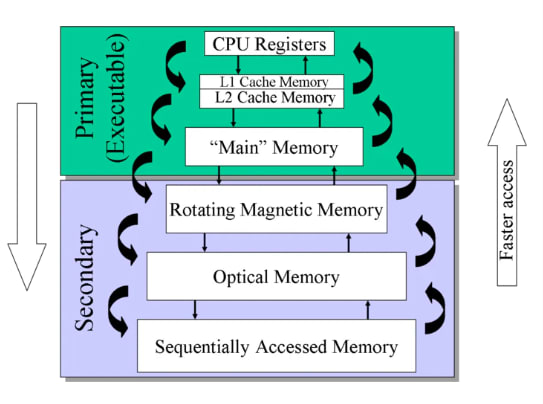
In Computer System Design, Memory Hierarchy is an enhancement to organize memory such that it minimizes access time. The Memory Hierarchy was developed based on a program behavior known as the locality of reference (the same data or nearby data is likely to be accessed repeatedly). The figure below clearly demonstrates the different levels of the memory hierarchy.
Memory Hierarchy helps optimize the use of memory available in the computer. There are multiple levels present in the memory, each with a different size, cost, and speed. Some types of memory, like cache and main memory, are faster but have smaller sizes and higher costs, whereas other types of memory have larger storage capacities but are slower. Data access time also varies across memory types; some provide faster access while others are slower.
Types This Memory Hierarchy Design is divided into two main types:
- External Memory or Secondary Memory: Comprising magnetic disks, optical disks, and magnetic tapes — peripheral storage devices that are accessible by the processor via an I/O module.
- Internal Memory or Primary Memory: Comprising main memory, cache memory, and CPU registers. This memory is directly accessible by the processor.
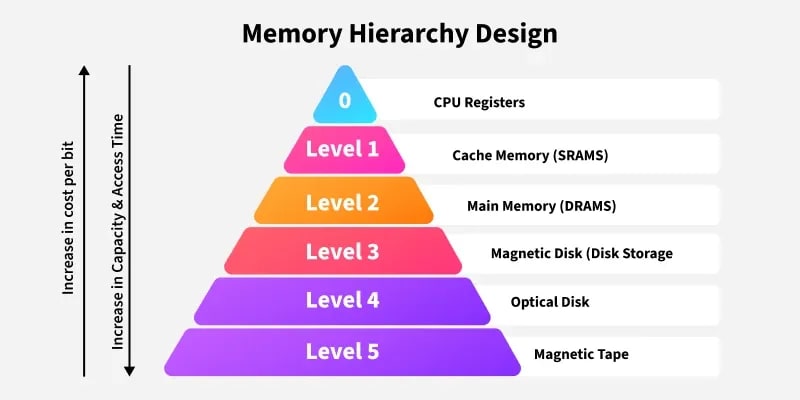
Memory Hierarchy Design
1. Registers Registers are small, high-speed memory units located in the CPU. They are used to store the most frequently used data and instructions. Registers have the fastest access time and the smallest storage capacity, typically ranging from 16 to 64 bits.
2. Cache Memory Cache memory is a small, fast memory unit located close to the CPU. It stores frequently used data and instructions that have been recently accessed from the main memory. Cache memory is designed to minimize the time it takes to access data by providing the CPU with quick access to frequently used information.
3. Main Memory Main memory, also known as RAM (Random Access Memory), is the primary memory of a computer system. It has a larger storage capacity than cache memory but is slower. Main memory stores data and instructions currently in use by the CPU.
Types of Main Memory
- Static RAM: Static RAM stores binary information in flip-flops, and the information remains valid as long as power is supplied. Static RAM has a faster access time and is used to implement cache memory.
- Dynamic RAM: It stores binary information as a charge on capacitors. It requires refreshing circuitry to maintain the charge on the capacitors at regular intervals. It contains more memory cells per unit area compared to SRAM.
4. Secondary Storage Secondary storage, such as hard disk drives (HDD) and solid-state drives (SSD), is non-volatile memory with a larger storage capacity than main memory. It stores data and instructions that are not currently in use by the CPU. Secondary storage has the slowest access time and is typically the least expensive type of memory in the memory hierarchy.
5. Magnetic Disk Magnetic disks are circular plates fabricated from metal, plastic, or magnetized material. Magnetic disks operate at high speed inside the computer and are frequently used for data storage.
6. Magnetic Tape Magnetic tape is a magnetic recording device covered with a plastic film. It is generally used for data backup. Magnetic tape has slower access times because the computer requires time to access the correct portion of the tape.
Characteristics of Memory Hierarchy
- Capacity: The total volume of information that memory can store. As we move from top to bottom in the hierarchy, capacity increases.
- Access Time: The time interval between a read/write request and the availability of data. As we move from top to bottom, access time increases.
- Performance: The memory hierarchy design ensures that frequently accessed data is stored in faster memory to improve system performance.
- Cost Per Bit: As we move from bottom to top in the hierarchy, the cost per bit increases — internal memory is costlier than external memory.
Advantages
- Performance: Frequently used data is stored in faster memory (like cache), reducing access time and improving overall system performance.
- Cost Efficiency: By combining small, fast memory (like registers and cache) with larger, slower memory (like RAM and HDD), the system achieves a balance between cost and performance, saving both money and time.
- Optimized Resource Utilization: Combines the benefits of small, fast memory and large, cost-effective storage to maximize system performance.
- Efficient Data Management: Frequently accessed data is kept closer to the CPU, while less frequently used data is stored in larger, slower memory, ensuring efficient data handling.
Disadvantages
- Complex Design: Managing and coordinating data across different levels of the hierarchy adds complexity to system design and operation.
- Cost: Faster memory components like registers and cache are expensive, limiting their size and increasing the overall system cost.
- Latency: Accessing data stored in slower memory (like secondary or tertiary storage) increases latency and reduces system performance.
- Maintenance Overhead: Managing and maintaining different types of memory adds overhead in terms of hardware and software.
Processor vs. Memory Speed
In Computer Architecture and Organization (CAO), understanding the relationship between processor speed and memory speed is essential because it directly impacts system performance. Here’s a breakdown of their differences and implications:
| Feature | Processor (CPU) Speed | Memory Speed |
|---|---|---|
| Definition | How fast the CPU can execute instructions | How quickly memory can read/write data |
| Typical Units | GHz (gigahertz) | MHz or GB/s (megahertz or gigabytes per second) |
| Relative Speed | Very fast (e.g., 3–5 GHz) | Slower (e.g., DDR4 ~ 2400–3200 MHz) |
| Main Focus | Instruction processing and execution | Data storage and retrieval |
| Bottleneck Issue | CPU often waits for data from memory | Can't always keep up with CPU demands |
Memory Wall Problem
- The memory wall refers to the growing gap between CPU speed and memory access time.
- As CPUs get faster, memory does not scale at the same rate, leading to increased CPU idle time while waiting for data.
Techniques to Bridge the Gap
1. Caching
- Small, fast memory (L1, L2, L3 cache) inside or near the CPU.
- Stores frequently accessed data to reduce memory latency.
2. Pipelining and Parallelism
- The CPU executes instructions in overlapping phases or uses multiple cores working in parallel to maximize throughput.
3. Memory Hierarchy
- Uses multiple levels (registers → caches → main memory → secondary storage).
- Reduces average access time by prioritizing faster, smaller memories.
4. Prefetching
- The memory controller predicts and loads data before the CPU requests it.
5. Memory Interleaving
- Increases throughput by accessing memory modules in parallel.
Main Memory
Main memory is the fundamental storage unit in a computer system. It is relatively large and fast memory that stores programs and data during computer operation. The technology behind main memory is based on semiconductor integrated circuits.
RAM is the main memory. Integrated circuit Random Access Memory (RAM) chips can operate in two possible modes:
Static - It consists of internal flip-flops that store binary information. The stored data remains intact as long as power is supplied. Static RAM is simple to use and has shorter read and write cycles.
Dynamic - It stores binary data as electrical charges in capacitors. These capacitors are implemented inside the chip using Metal-Oxide Semiconductor (MOS) transistors. The stored charge gradually dissipates, so the capacitors must be periodically recharged to maintain the data.
Random Access Memory
The term Random Access Memory (RAM) refers to memory that can be easily read from and written to by the microprocessor. For memory to be called random access, it must allow access to any address at any time. This distinguishes RAM from sequential storage devices such as tapes or hard drives.
RAM is the main memory of a computer. Its purpose is to store data and applications that are currently in use. The operating system manages this memory, determining when items are loaded into RAM, where they are located, and when they are removed.
Read-Only Memory
Every computer system requires a segment of memory that remains fixed and unaffected by power loss. This type of memory is known as Read-Only Memory (ROM).
SRAM
RAM made up of circuits that preserve information as long as power is supplied is called Static Random Access Memory (SRAM). Flip-flops serve as the basic memory elements in an SRAM device. An SRAM consists of an array of flip-flops — one for each bit. Since a large number of flip-flops are needed for high-capacity memory, simpler flip-flop circuits using BJT and MOS transistors are employed in SRAM.
DRAM
SRAM is faster but more expensive because its cells require multiple transistors. A lower-cost alternative is achieved using simpler cells based on capacitors. These cells cannot preserve data indefinitely and must be periodically recharged. Such cells are called dynamic storage cells, and RAMs using them are referred to as Dynamic RAMs (DRAM).
Here is your updated para with corrected grammar and explanations:
Auxiliary Memories
Auxiliary memory refers to the lowest-cost, highest-capacity, and slowest-access storage in a computer system. It is where programs and data are preserved for long-term storage or when not in direct use. The most common auxiliary memory devices used in computer systems are magnetic disks and tapes.
Magnetic Disks
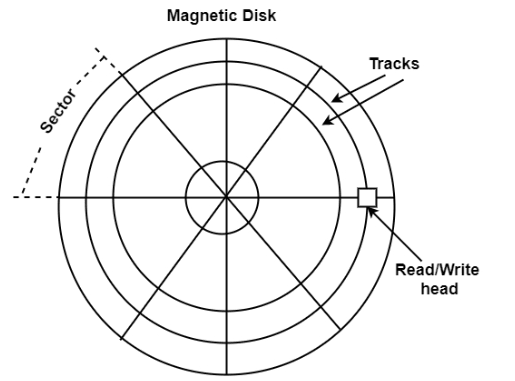
A magnetic disk is a circular plate made of metal or plastic coated with a magnetized material. Both sides of the disk are used, and multiple disks can be stacked on a single spindle with read/write heads positioned on each surface. All disks rotate together at high speed and are not stopped or started during access operations. Bits are stored on the magnetized surface in patterns along concentric circles known as tracks. The tracks are further divided into segments called sectors. In this system, the smallest unit of data that can be transferred is a sector. The subdivision of one disk surface into tracks and sectors is shown in the figure.
Magnetic Tape
A magnetic tape system includes the mechanical, electronic, and control components necessary to operate a magnetic tape unit. The tape itself is a strip of plastic coated with a magnetic recording material. Bits are recorded as magnetic marks along multiple tracks on the tape. Seven or nine bits are recorded together to represent a character along with a parity bit. Read/write heads are mounted one per track so that data can be recorded and read as a series of characters. Magnetic tape units can start, stop, move forward, or move in reverse. However, they cannot start or stop fast enough to handle individual characters. For this reason, data is recorded in blocks called records. Gaps of unrecorded tape are inserted between records to allow for stopping and starting. The tape begins moving while in a gap and reaches a constant speed by the time it arrives at the next record. Each record on the tape has a unique bit pattern at the beginning and end. By reading this pattern at the start, the tape control identifies the data block.
High-Speed Memories
High-speed memories are critical components in memory systems designed to improve data access times and overall system performance. They often serve as buffers or caches to bridge the speed gap between fast processors and slower main memory.
Common types of high-speed memories:
-
Cache Memory:
- Located closest to the CPU.
- Very fast but small in size.
- Stores frequently accessed data and instructions.
- Levels: L1 (smallest, fastest), L2, L3 (larger but slower).
-
Static RAM (SRAM):
- Faster than Dynamic RAM (DRAM).
- Used for cache memory.
- More expensive and less dense.
- Does not need to be refreshed like DRAM.
-
Register Files:
- Extremely fast storage inside the CPU.
- Stores operands for immediate processing.
- Typically implemented using SRAM.
-
Buffers and FIFOs (First-In, First-Out):
- Temporary storage that smooths data transfer between components operating at different speeds.
-
High-Speed DRAM Variants:
- Like SRAM, some DRAM types (e.g., DDR4, DDR5) are optimized for higher speed.
Architectural Design In the context of memory design for CAO tools (used for optimizing integrated circuits), high-speed memory design considerations include:
- Minimizing latency through hierarchical memory design.
- Using multi-port SRAM to allow simultaneous read/write operations.
- Employing pipelining and prefetching techniques.
- Designing for power efficiency while maintaining speed.
- Optimizing placement and routing to reduce signal delays.
Cache Memory
Cache memory is a small, high-speed storage area in a computer. It is a smaller and faster memory that stores copies of data from frequently used main memory locations. Modern CPUs have various independent caches for storing instructions and data.
- The primary purpose of cache memory is to reduce the average time to access data from main memory.
- Cache memory works effectively due to the principle of locality of reference (the same data or nearby data are likely to be accessed again soon).
By storing this data closer to the CPU, cache memory helps speed up overall processing. Cache memory is significantly faster than main memory (RAM). When the CPU needs data, it first checks the cache. If the data is present (cache hit), the CPU accesses it quickly. If the data is not present (cache miss), it must fetch it from the slower main memory.
- Cache is an extremely fast memory type that acts as a buffer between RAM and the CPU.
- It holds frequently requested data and instructions, making them immediately available to the CPU.
- Cache memory is more expensive than main memory or disk storage but more affordable than CPU registers.
- It is used to enhance processing speed and synchronize with the high-speed CPU.
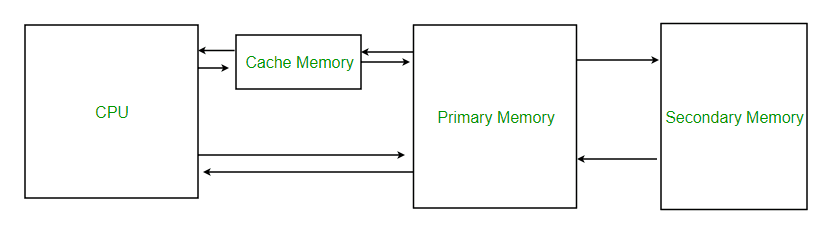
Levels of Memory
- Level 1 or Registers: Memory where data is stored and accessed immediately by the CPU. Common registers include Accumulator, Program Counter, and Address Register.
- Level 2 or Cache Memory: The fastest memory, temporarily storing data for quick access.
- Level 3 or Main Memory: The working memory (RAM), used during current operations. It is volatile and loses data when power is off.
- Level 4 or Secondary Memory: External memory that is slower than main memory but retains data permanently.
Cache Performance - When the processor needs to read or write a location in main memory, it first checks for a corresponding entry in the cache.
- If the memory location is found in the cache, a cache hit occurs and the data is read from the cache.
- If the memory location is not found in the cache, a cache miss occurs. The cache then loads the data from main memory into a new cache entry, after which the CPU accesses it from the cache.
The performance of cache memory is often measured using the hit ratio, defined as:
Hit Ratio (H) = hits / (hits + misses) = no. of hits / total accesses
Miss Ratio = misses / (hits + misses) = no. of misses / total accesses = 1 - Hit Ratio (H)
Cache performance can be improved by:
- Increasing cache block size.
- Increasing associativity.
- Reducing miss rate.
- Reducing miss penalty.
- Reducing cache hit time.
Cache Mapping
Cache mapping refers to the method used to store data from main memory into the cache. It determines how data from memory is mapped to specific locations in the cache.
There are three different types of mapping used for the purpose of cache memory, which are as follows:
- Direct Mapping
- Fully Associative Mapping
- Set-Associative Mapping
1. Direct Mapping
Direct mapping is a simple and commonly used cache mapping technique where each block of main memory is mapped to exactly one location in the cache called a cache line. If two memory blocks map to the same cache line, one will overwrite the other, leading to potential cache misses. The performance of direct mapping is directly proportional to the hit ratio.
A memory block is assigned to a cache line using the formula below:
i = j modulo m = j % m
where,
i = cache line number
j = main memory block number
m = number of lines in the cache
For example, consider a memory with 8 blocks (j) and a cache with 4 lines (m). Using direct mapping, block 0 of memory might be stored in cache line 0, block 1 in line 1, block 2 in line 2, and block 3 in line 3. If block 4 of memory is accessed, it would be mapped to cache line 0 (as i = j modulo m i.e. i = 4 % 4 = 0), replacing memory block 0.
The main memory consists of memory blocks, and these blocks are made up of a fixed number of words. A typical address in main memory is split into two parts:
- Index Field: It represents the block number. The index field bits indicate the location of the block where a word can be found.
- Block Offset: It represents words within a memory block. These bits determine the location of a word within a memory block.
The cache memory consists of cache lines. These cache lines have the same size as memory blocks. The address in cache memory consists of:
- Block Offset: This is the same block offset used in main memory.
- Index: It represents the cache line number. This part of the memory address determines which cache line (or slot) the data will be placed in.
- Tag: The tag is the remaining part of the address that uniquely identifies which block is currently occupying the cache line.
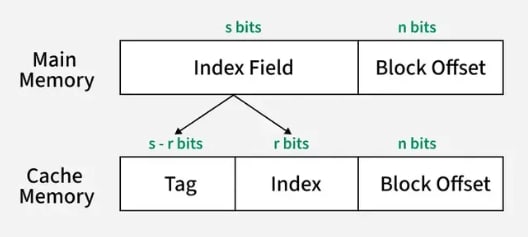
The index field in main memory maps directly to the index in cache memory, which determines the cache line where the block will be stored. The block offset in both main memory and cache memory indicates the exact word within the block. In the cache, the tag identifies which memory block is currently stored in the cache line. This mapping ensures that each memory block is mapped to exactly one cache line, and the data is accessed using the tag and index, while the block offset specifies the exact word in the block.
2. Fully Associative Mapping
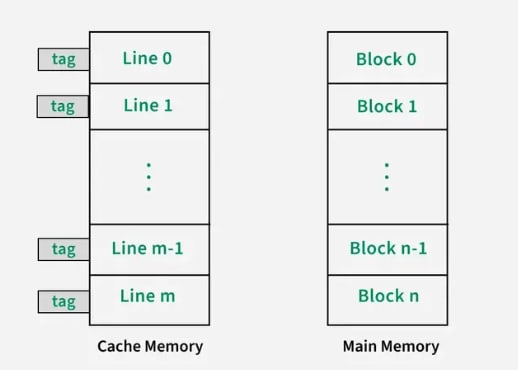
Fully associative mapping is a type of cache mapping where any block of main memory can be stored in any cache line. Unlike direct-mapped cache, where each memory block is restricted to a specific cache line based on its index, fully associative mapping gives the cache the flexibility to place a memory block in any available cache line. This improves the hit ratio but requires a more complex system for searching and managing cache lines.
The address structure of cache memory is different in fully associative mapping compared to direct mapping. In fully associative mapping, the cache does not have an index field. It only has a tag, which is the same as the index field in the memory address. Any block of memory can be placed in any cache line. This flexibility means that there is no fixed position for memory blocks in the cache.
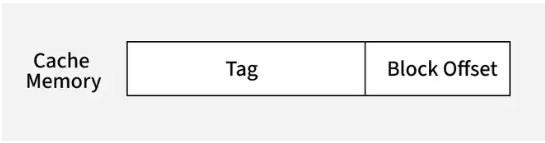
To determine whether a block is present in the cache, the tag is compared with the tags stored in all cache lines. If a match is found, it is a cache hit, and the data is retrieved from that cache line. If no match is found, it's a cache miss, and the required data is fetched from main memory.
3. Set-Associative Mapping
Set-associative mapping is a compromise between direct-mapped and fully-associative mapping in cache systems. It combines the flexibility of fully associative mapping with the efficiency of direct mapping. In this scheme, multiple cache lines (typically 2, 4, or more) are grouped into sets.
v = m / k
where,
m = number of cache lines in the cache memory
k = number of cache lines in each set
v = number of sets
Like direct mapping, now each memory block can be placed into any cache line within a specific set.
i = j modulo v = j % v
where,
j = main memory block number
v = number of sets
i = cache line set number
The cache address structure is as follows:
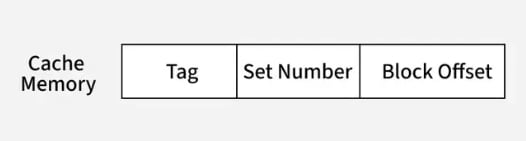
This reduces the conflict misses that occur in direct mapping while still limiting the search space compared to fully-associative mapping.
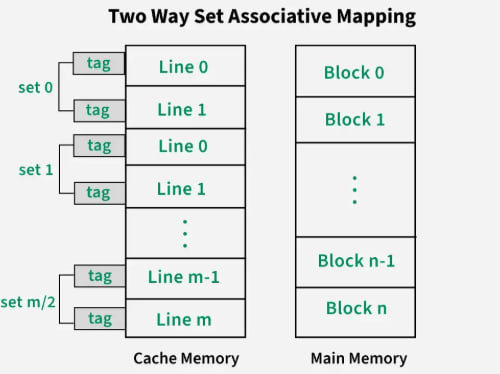
For example, consider a 2-way set-associative cache, which means 2 cache lines make a set in this cache structure. There are 8 memory blocks and 4 cache lines, thus the number of sets will be 4/2 = 2 sets. Using a direct mapping strategy first, block 0 will be in set 0, block 1 in set 1, block 2 in set 0, and so on. Then, the tag is used to search through all cache lines in that set to find the correct block (associative mapping).
Application of Cache Memory
- Primary Cache: A primary cache is always located on the processor chip. This cache is small, and its access time is comparable to that of processor registers.
- Secondary Cache: Secondary cache is placed between the primary cache and the rest of the memory. It is referred to as the level 2 (L2) cache. Often, the level 2 cache is also housed on the processor chip.
- Spatial Locality of Reference: Spatial locality of reference states that there is a chance that an element will be present in close proximity to the reference point, and the next time it is searched, it will likely be in even closer proximity to the point of reference.
- Temporal Locality of Reference: Temporal locality of reference uses the least recently used algorithm. Whenever a page fault occurs, not only will the word be loaded into main memory, but the entire page will be loaded because the spatial locality of reference rule suggests that if you are referring to one word, the next word will likely be referred to soon. Therefore, the complete page is loaded.
Advantages
- Cache memory is faster in comparison to main memory and secondary memory.
- Programs stored in cache memory can be executed in less time.
- The data access time of cache memory is less than that of the main memory.
- Cache memory stores data and instructions that are regularly used by the CPU, thereby increasing CPU performance.
Disadvantages
- Cache memory is costlier than primary memory and secondary memory.
- Data is stored on a temporary basis in cache memory.
- Whenever the system is turned off, data and instructions stored in cache memory are lost.
- The high cost of cache memory increases the price of the computer system.
Associative Memory
Associative memory is also known as content-addressable memory (CAM), associative storage, or associative array. It is a special type of memory that is optimized for performing searches through data, as opposed to providing simple direct access to the data based on the address.
It can store a set of patterns as memories. When associative memory is presented with a key pattern, it responds by producing one of the stored patterns that closely resembles or relates to the key pattern.
It can be viewed as data correlation—input data is correlated with the stored data in the CAM.
It consists of two types:
- Auto-Associative Memory Network: An auto-associative memory network, also known as a recurrent neural network, is a type of associative memory used to recall a pattern from partial or degraded inputs. In an auto-associative network, the output of the network is fed back into the input, allowing the network to learn and remember the patterns it has been trained on. This type of memory network is commonly used in applications such as speech and image recognition, where the input data may be incomplete or noisy.
- Hetero-Associative Memory Network: A hetero-associative memory network is a type of associative memory that associates one set of patterns with another. In a hetero-associative network, the input pattern is associated with a different output pattern, allowing the network to learn and remember associations between two sets of patterns. This type of memory network is commonly used in applications such as data compression and data retrieval.
Associative memory is a form of conventional semiconductor memory (usually RAM) with added comparison circuitry that enables a search operation to complete in a single clock cycle. It functions as a hardware search engine—a special type of computer memory used in certain very high-speed searching applications.
Associative memory, or content-addressable memory, allows data to be accessed based on content rather than location. It is particularly useful in high-speed searching applications.
Hardware Organization of Associative Memory:
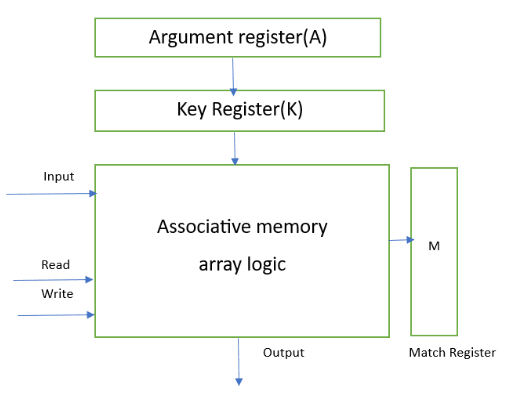
- Argument Register: It contains words to be searched and has 'n' bits.
- Match Register: It has 'm' bits, with one bit corresponding to each word in the memory array. After the matching process, the bits corresponding to matching words in the match register are set to '1'.
- Key Register: It provides a mask for selecting a particular field/key in the argument register. It specifies which part of the argument word needs to be compared with the words in memory.
- Associative Memory Array: It holds the words to be compared with the argument word in parallel. It contains 'm' words with 'n' bits per word.
Applications
- It can be used in memory allocation formats.
- It is widely used in database management systems.
- Networking: Associative memory is used in network routing tables to quickly find the path to a destination network based on its address.
- Image Processing: Associative memory is used in image processing applications to search for specific features or patterns within an image.
- Artificial Intelligence: Associative memory is used in AI applications such as expert systems and pattern recognition.
- Database Management: Associative memory can be used in database management systems to quickly retrieve data based on its content.
Advantages
- It is used where search time needs to be very short.
- It is suitable for parallel searches.
- It is often used to speed up databases.
- It is used in page tables for virtual memory and in neural networks.
Disadvantages
- It is more expensive than RAM.
- Each cell must have both storage capability and logical circuits for matching its content with an external argument.
Virtual Memory
Virtual memory is the partitioning of logical memory from physical memory. This partitioning supports large virtual memory for programmers when only limited physical memory is available.
Virtual memory can give programmers the illusion that they have a large amount of memory, even when the computer has only a small amount of main memory. It simplifies programming because the programmer no longer needs to worry about the limited physical memory available.
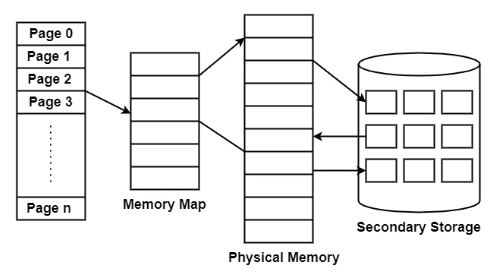
Virtual memory operates similarly but at one level higher in the memory hierarchy. A memory management unit (MMU) transfers data between physical memory and some secondary storage device, generally a disk. This storage area is defined as a swap disk or swap file, based on its implementation. Retrieving data from physical memory is much faster than accessing data from the swap disk.
There are two primary methods for implementing virtual memory:
Paging
Paging is a technique of memory management where small fixed-length pages are allocated instead of a single large variable-length contiguous block, as in dynamic allocation techniques. In a paged system, each process is divided into several fixed-size chunks called pages, typically 4KB in length. The memory space is also divided into blocks of equal size, known as frames.
Advantages of Paging
The following are the advantages of paging:
- Paging eliminates the need for external fragmentation.
- Swapping among equal-size pages and page frames is straightforward.
- Paging is a simple and efficient approach for memory management.
Disadvantages of Paging
The following are the disadvantages of paging:
- Paging may cause internal fragmentation.
- The page table consumes additional memory.
- Multi-level paging can introduce memory reference overhead.
Segmentation
Segmentation is the partitioning of memory into logical units called segments, based on the user’s perspective. Segmentation allows each segment to grow independently and to be shared. In other words, segmentation is a technique that partitions memory into logically related units called segments, meaning that a program is a collection of segments.
Unlike pages, segments can vary in size. This requires the MMU to manage segmented memory differently than paged memory. A segmented MMU contains a segment table to track the segments resident in memory.
A segment can start at various addresses and can be of any size, so each segment table entry must contain the start address and segment size. Some systems allow a segment to start at any address, while others impose limits on the start address. For example, in the Intel x86 architecture, a segment must start at an address where the lower four bits are 0000.
Memory Management Hardware
Memory management hardware in computer architecture plays a crucial role in ensuring the efficient and effective use of a computer's memory. It is responsible for organizing and allocating memory resources to different processes and applications running on the system. Without proper memory management, computing systems would quickly become overwhelmed, leading to crashes, slow performance, and other issues.
The history of memory management hardware dates back to the early days of computing when physical memory was limited and manual management was required. Over the years, advancements in technology have led to the development of hardware-based memory management systems that automate the process, improving performance and reliability. Today, memory management hardware solutions are integrated into modern computer architectures, enabling seamless multitasking, efficient memory allocation, and effective utilization of available memory resources.
Memory management hardware includes features such as memory caches, memory controllers, and memory management units (MMUs). These components work together to ensure efficient access to data, reduce latency, and enhance overall system responsiveness. Additionally, memory management hardware supports memory allocation and deallocation, virtual memory management, and protection mechanisms. This advanced hardware is essential for modern computer systems to deliver optimal performance and meet the demands of complex applications and multitasking environments.
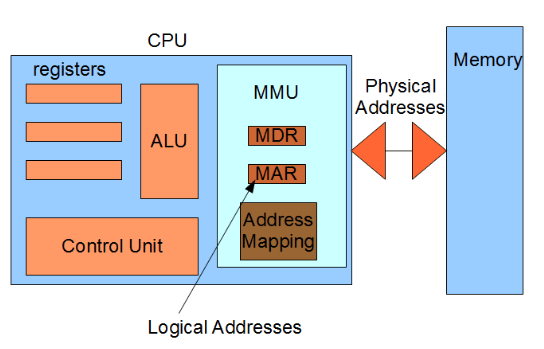
The memory management hardware consists of several key components that work together to ensure efficient memory usage and allocation. These components include:
- Memory Management Unit (MMU): The MMU is a critical component of memory management hardware. It translates virtual addresses to physical addresses, enabling the system to access the correct memory location.
- Translation Lookaside Buffer (TLB): The TLB is a cache that stores recently used virtual-to-physical address translations, speeding up the address translation process.
- Memory Segmentation Unit: This unit divides the memory into segments to organize and manage memory resources efficiently.
- Memory Protection Unit (MPU): The MPU enforces access permissions and prevents unauthorized access, ensuring the security and protection of memory.
Memory Management Unit (MMU)
- The MMU performs the essential task of translating virtual addresses generated by the CPU into physical addresses, allowing the system to access the correct memory location.
- The MMU works in conjunction with the operating system's memory management software to allocate and manage memory resources effectively. It uses address translation, which involves converting virtual addresses to physical addresses using page tables or translation tables.
- The MMU also plays a vital role in memory protection by enforcing access permissions, ensuring that each process can only access its allocated memory, and preventing unauthorized access to sensitive information.
Translation Lookaside Buffer (TLB)
- The TLB is a cache in the memory management hardware that stores recently used virtual-to-physical address translations. It acts as a high-speed memory for address translation, improving overall system performance.
- When the CPU generates a virtual address, the TLB checks if the translation is available in its cache. If found, the TLB provides the corresponding physical address, eliminating the need for a time-consuming lookup in the page tables.
- The TLB operates on the principle of locality, which states that recently accessed memory locations are likely to be accessed again soon. By storing frequently used translations, the TLB reduces the overhead of address translation, improving system performance.
Functions of Memory Management Hardware
The memory management hardware performs several critical functions to ensure efficient memory usage and allocation. These functions include:
- Address Translation: Translates virtual addresses into physical addresses, allowing the CPU to access the correct memory location.
- Memory Allocation: Allocates and deallocates memory resources to processes, ensuring that each process has sufficient memory to execute efficiently.
- Memory Protection: Enforces access permissions and prevents unauthorized access to memory areas.
- Virtual Memory Management: Manages the mapping of virtual addresses to physical addresses, enabling the efficient use of limited physical memory by utilizing disk-based virtual memory.
Address Translation
- Address translation involves converting virtual addresses generated by the CPU into physical addresses, allowing the system to access the correct memory location.
- During address translation, the memory management hardware uses page tables or translation tables to map virtual addresses to physical addresses. This process ensures that each process has isolated memory space, protecting it from interference by other processes.
- Address translation is essential for enabling the efficient use of physical memory and supporting the concurrent execution of multiple processes.
Memory Allocation
- Memory allocation involves assigning memory resources to processes and deallocating them when they are no longer needed.
- The memory management hardware tracks available memory blocks and allocates them to processes based on their memory requirements. It ensures that each process has enough memory to execute efficiently, preventing resource contention.
- Efficient memory allocation allows the simultaneous execution of multiple processes, maximizing system productivity. It also minimizes wastage and fragmentation, optimizing overall system performance.
Techniques Used in Memory Management Hardware
Memory management hardware employs various techniques to enhance memory utilization and performance. Common techniques include:
- Paging: Divides memory into fixed-size blocks called pages and maps them in a virtual address space. It enables efficient memory allocation and utilization.
- Segmentation: Divides memory into logical segments based on program structure and memory requirements. It offers flexibility but can lead to external fragmentation.
- Virtual Memory: Allows the execution of programs larger than the available physical memory by using disk-based storage to supplement physical memory.
- Memory Protection: Implements access permissions and privilege levels to ensure the security and integrity of memory.
Paging
- Paging divides memory into fixed-size blocks called pages, which are then mapped into a virtual address space to facilitate efficient memory allocation and utilization.
- It allows for demand-based allocation of memory resources. When a process requires additional memory, the hardware allocates new pages to the process.
- Paging also provides protection and isolation by assigning each process its own page tables, preventing unauthorized access and interference.
Virtual Memory
- Virtual memory allows the execution of programs larger than the available physical memory by using disk-based storage as an extension of physical memory.
- The memory management hardware transfers data between physical memory and disk storage as needed, using techniques like demand paging or demand segmentation.
- Virtual memory improves system performance by allowing larger programs to run without needing an equivalent amount of physical memory, enabling the efficient execution of memory-intensive applications.
Role of Memory Management Hardware in Computer Architecture
- Memory management hardware is critical in computer architecture for efficient memory usage, allocation, and protection. It manages the memory subsystem, enabling the execution of various programs and processes.
- Components such as the MMU and TLB enable address translation and optimize memory access by caching frequently used translations, reducing overhead.
- By managing memory allocation, the hardware supports the simultaneous execution of multiple programs. It also enforces protection mechanisms to maintain memory security and integrity.
Furthermore, techniques like paging, segmentation, and virtual memory enhance memory utilization and performance. They enable efficient memory allocation, utilization, and the execution of programs larger than available physical memory.
In conclusion, memory management hardware is a crucial component of computer architecture. It plays a vital role in managing memory resources, optimizing performance, and ensuring the smooth execution of programs and processes.
Computer Arithmetic
Unsigned, signed and floating-point data representation, addition, subtraction, multiplication and division algorithms. Booth's multiplication algorithm.
Introduction to Parallel Processing
Flynn's classification, pipelining, arithmetic pipeline, instruction pipeline, characteristics of multiprocessors, inter connection structures, inter processor arbitration, interprocessor communication & synchronization